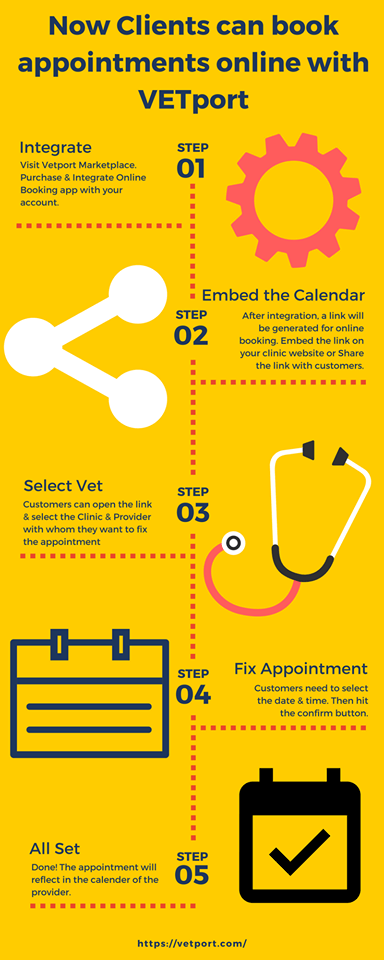
Clients can Book Vet Appointments Online with VETport
Online booking lets clients book vet appointments themselves, at any hour, from your own website. The calendar is embedded in your site, the client picks the service and the veterinarian, and the confirmed appointment lands directly in the practice diary with a reminder already scheduled.
How it fits into your website
The booking calendar is embedded in your own site rather than sending clients to a separate address, so the journey from reading a page to holding an appointment is one step. Practices usually place it on the home page, the contact page and any service page where someone has just decided they need to come in.
Clients choose the service and the veterinarian
Owners often want a particular vet, especially for an ongoing case, and being told to ring the practice to arrange that undoes most of the convenience. Letting the client select the veterinarian and the appointment type means the slot booked is the right length for the work, and continuity of care survives the booking process.
The appointment lands in the diary
A confirmed booking appears in the practice diary immediately, with the client and patient matched to existing records where they exist. No one retypes anything, there is no separate list to reconcile at the start of the day, and the confirmation and reminders are scheduled automatically.
You still control the diary
Online booking does not mean handing over the schedule. You decide which slot types are exposed, how far ahead people can book, how much emergency capacity is held back, and what new clients are allowed to book into. The diary fills the way you designed it rather than at random, which is the difference between a useful feature and a daily headache.
Why the evening matters
A large share of bookings made online happen outside opening hours. Those are the appointments that would otherwise have been a phone call the client kept meaning to make. Capturing them is where most of the additional revenue from online booking comes from, rather than from clients who would have rung anyway.
What it does to no-shows
Self-booked appointments arrive with a valid mobile number and email address, which makes them easier to remind than appointments taken over the phone. Combined with automatic confirmations, most practices find online booking reduces no-shows rather than increasing them.
Getting started
Start narrow. Expose two or three appointment types, keep emergency slots off the public calendar, and watch the first month. Widen it once you can see the pattern of what clients are actually booking and when.
What to tell clients when you switch it on
Adoption follows from being told at the moment it is useful. Mention it when someone books at the desk, put the link in every reminder and confirmation, and add it to the footer of your email. Practices that quietly enable online booking and wait for people to find it usually conclude wrongly that clients do not want it.
What it does not replace
Online booking is for routine appointments. Emergencies, complicated cases and anything needing triage still belong on the phone, and the booking page should say so plainly with the emergency number alongside it. Being explicit about that is what keeps the diary safe, and it reassures owners who are unsure whether their situation can wait.
Measuring whether it is working
Give it a quarter, then look at three numbers. What share of appointments were booked online rather than by phone. How many of those arrived outside opening hours. And whether the no-show rate moved. The first tells you about adoption, the second is the genuinely new business, and the third confirms that self-booked appointments are at least as reliable as the ones taken at the desk.
Most practices find the share climbs steadily for the first few months and then settles. When clients can book vet appointments in the evening without waiting for the practice to open, the habit forms quickly, and reception gets its mornings back.

